Tracking
Tracking connects objects or particles frame-to-frame (or volume-to-volume in 3D) over time-lapse sequences.
A binary object typically has a different object ID in consecutive frames. Tracking nodes assign a new track ID to objects in such way that objects keep that ID over the whole time-lapse.
Therefore, tracking is necessary when investigating single object behavior over time.
There are two distinct tracking nodes:
Track Objects that takes a binary layer as input and connects binary objects that overlap frame-to-frame.
Track Particles that takes a table with objects as input and connects objects as they fit the motion model while minimizing global error frame-to-frame. The table must contain time and position of each object. This is useful when objects can be reduced to points of mass: particles.
Both nodes output a table that has track ID assigned to objects that are part of a track.
In order to see tracked objects in the preview they must be accumulated using Accumulate Tracks.
See also: Tracking workflow
Object Position
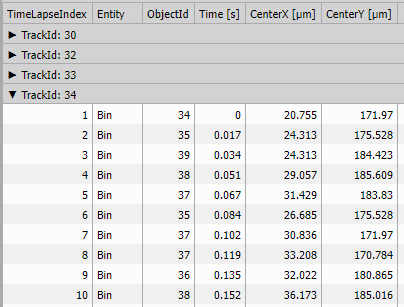
Convenience measurement nodes for calculating the time and position of each object. The same measurement can be done using ordinary Measure object.
Time & Center
It produces a table where every row corresponds to an object (input A - Binary).
The node measures Time and Center for each object (together with default book keeping columns):
- loop indexes for book keeping (one-based),
- object entity and id for book keeping,
- Time [s] acquisition time assigned to each objects and
- Center calibrated X and Y (and Z if 3D) coordinate.
See also: Object Position (group)
Time & CenterAbs
It produces a table where every row corresponds to an object (input A - Binary).
The node measures Time and CenterAbs for each object (together with default book keeping columns):
- loop indexes for book keeping (one-based),
- object entity and id for book keeping,
- Time [s] acquisition time assigned to each objects and
- CenterAbs stage calibrated X and Y (and Z if 3D) coordinate.
See also: Object Position (group)
Time & Centroid
It produces a table where every row corresponds to an object (input A - Binary).
The node measures Time and Center for each object (together with default book keeping columns):
- loop indexes for book keeping (one-based),
- object entity and id for book keeping,
- Time [s] acquisition time assigned to each objects and
- Centroid calibrated X and Y (and Z if 3D) coordinate.
See also: Object Position (group)
Time & CentroidAbs
It produces a table where every row corresponds to an object (input A - Binary).
The node measures Time and CentroidAbs for each object (together with default book keeping columns):
- loop indexes for book keeping (one-based),
- object entity and id for book keeping,
- Time [s] acquisition time assigned to each objects and
- CentroidAbs stage calibrated X and Y (and Z if 3D) coordinate.
See also: Object Position (group)
Tracking
Track Objects
The node takes objects (input A - Binary) and connects them based on their frame-to-frame overlap area. When there are more candidates (more objects in one frame overlap with an object on the other) the one with the biggest overlap is chosen.
The node returns a table with following columns:
- loop indexes for book keeping (one-based),
- object entity and ID for book keeping,
- TrackId acquisition time assigned to each objects.
Parameters
See also: Track moving objects
Track Particles
The node takes particles represented by time and position (input A - Table) and connects them based on predicted position. Every particle is assigned a cost based on the distance from the predicted point. The algorithm minimizes the sum of the costs in each frame-to-frame linking step.
There are two models implemented:
- Random motion model predicts the particle at the same place and
- Constant speed model predicts the next position using Kalman filter and current position and velocity.
The algorithm is inspired by the Robust single-particle tracking in live-cell time-lapse sequences paper by Jaqaman, K. et al. published in Nature Methods 2008 Vol. 5 No. 8.published in Nature Methods 2008 Vol. 5 No. 8.
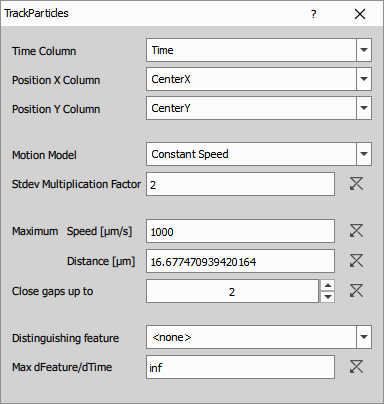
Parameters:
- Source time and position columns define particle positions,
- Motion model is either Random motion or Constant speed,
- Stdev multiplication factor is the relative cut-off distance; the bigger the number more objects are allowed to compete for continuation of a track,
- Maximum speed/distance is absolute cut-off ; the bigger the distance more objects are allowed to compete for continuation of a track,
- Close gaps defines how many gaps can be in the track and
- Distinguishing feature and its cut-off lets the user specify a column that may help the algorithm to discriminate between objects.
The node returns a table with following columns:
- loop indexes for book keeping (one-based),
- object entity and ID for book keeping,
- Time [s] acquisition time as defined in the settings dialog,
- Position X and Y (and Z if 3D) coordinate of the position defined in the settings dialog and
- TrackId ID of the track the object belongs to or empty if there is none.
Algorithm overview
1. Frame-to-frame linking
The algorithm works with a set of active tracks. Initially - in the first frame each object is set to be an active track. Then the algorithm goes through all frames in time and tries to extend the track. An object not fitting to any track may initiate a new active track (if ignore new tracks is unchecked) at any time as well. At a given frame, each track can be linked to at most one object. If there is no suitable link a gap is introduced. In case that Gap Closing is disabled, the track is terminated and no longer active for further linking. If gaps are allowed the track remains active. It can link until the gap length reaches the threshold which terminates it.
The goal of linking is to find the best correspondence between active tracks so far and objects in the current frame. A probability for each possible link (active track with object) together with a probability of track ending is calculated. The result is the solution with globally (over all possibilities: linking, gap closing, track ending and new track starting) highest probability.
The probability of a link is the likelihood that the track will extend through the given object. As each track is built a Kalman filter is applied and its prediction and error estimate are used to calculate a multidimensional Gaussian probability distribution function for a given frame. From this function it is possible calculate the probability that any object links with the given track.
The probability of non-linking (i.e. track termination) is given by user as a multiplication factor of Standard deviation. The lower the factor the smaller the linking area becomes and the probability of non-linking increases. The Standard Deviation is calculated for each track and time-point. With increasing object speeds the Standard deviation increases as well. This criterion is relative.
Additionally, user can set an absolute maximum speed, which eliminates impossible links right away.
Splitting or merging is not possible.
2. Distinguishing feature
Some “distinguishing” object feature may be selected to be included into probability calculation. Feature that is selected should have the ability to distinguish between objects that form distinct tracks. Maximum change per second may be set for every feature as a restriction. Infinity means that the feature is not restricted.
Parameters
See also: Particle tracking with motion analysis
Tracks
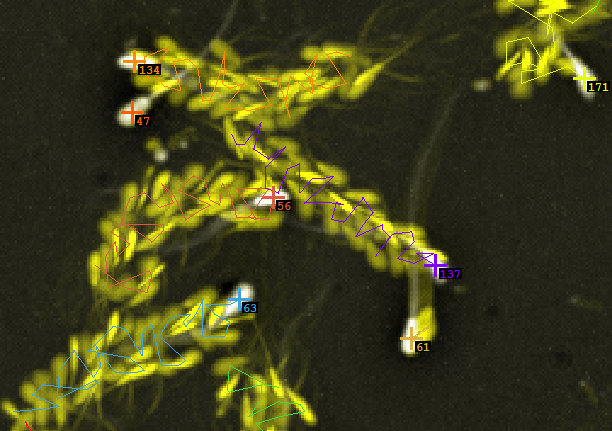
An object track or trajectory (schematically shown in the picture) is a sequence of segments that connects successive object positions . Each object position has a time value associated with it.
The tracking overlay shows track IDs and the track itself.
Accumulate Tracks
Accumulates the tracked objects over whole time-lapse. It filters out objects that are not part of any track and optionally removes objects that are in tracks shorter than specified number. It also groups the records by track IDs.
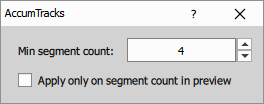
Parameters:
- Min. segment count optionally filters the tracks based on their length.
- Apply only on segment count in preview is an optimization for GA3 preview ; when checked the preview runs only on the number of frames specified.
Parameters
See also: Tracks (group)
MSD
The node calculates Mean Squared Displacement (MSD) over accumulated tracks.
Parameters define the source columns for the calculation.
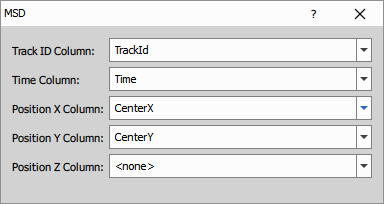
The node returns a table containing one row for every track segment and following columns:
- object entity for book keeping,
- TrackId,
- ΔTime [s] is calibrated ,
- MSD [µm²] is mean squared displacement over track segments,
- Stdev [µm²] is standard deviation of squared displacements over track segments,
- Count number track segments.
For each track it computes the MSDs as a function of the time lag .
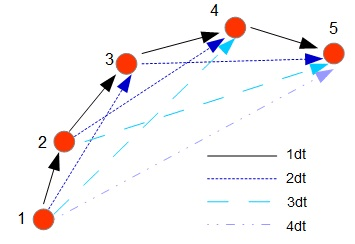
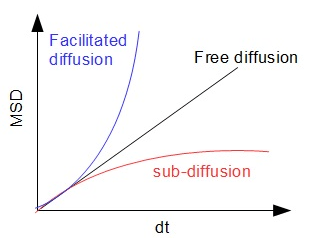
MSD is the standard statistic to investigate diffusion. In the case of free diffusion, the slope of the MSD is equal to the diffusion coefficient .
Parameters
See also: Single particle tracking with diffusion analysis, Tracks (group)
Tracking Features
Tracking features measure dynamic properties of objects:
- at any given point in time (Feature Derivative and Motion Features) or
- as aggregates for the whole track (Track Features).
Feature Derivative
The node measures any selected feature rate of change.
Parameters
See also: Tracking Features (group)
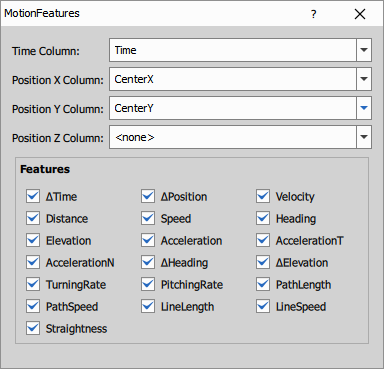
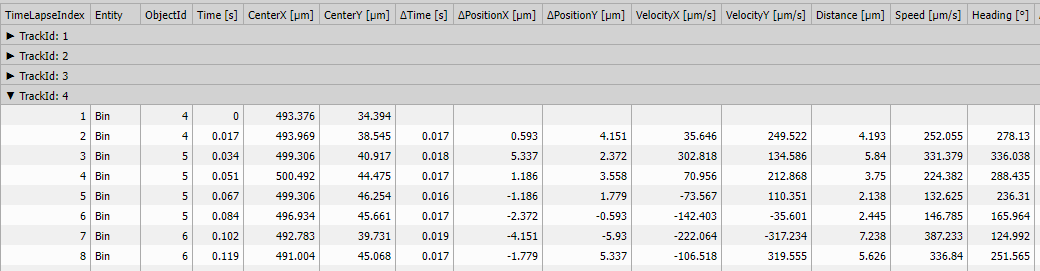
Motion Features
Motion features measure dynamic properties of tracked objects at any given point in time .
Parameters
See also: Tracking Features (group)
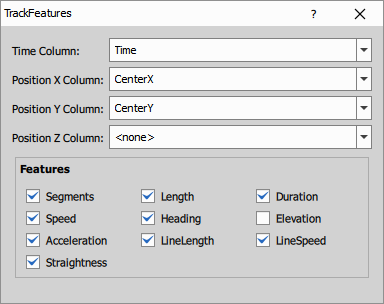
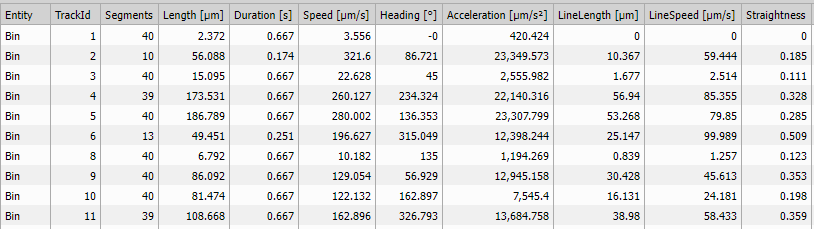
Track Features
Track features measure aggregated dynamic properties for whole tracks.
Parameters
See also: Tracking Features (group)
Results
Export Tracking
Mark a finalized tracking table as a stored tracking result so it is available to tracking export and reporting workflows.